Requirements
What information does the application need?ใบสมัครต้องการข้อมูลอะไรบ้าง?
Applicant typesประเภทผู้สมัครIndividual and Juristicบุคคล และนิติบุคคล
Time to complete the applicationเวลาที่ใช้ในการกรอกใบสมัคร15-20 minutes15-20 นาที
To meet compliance requirements and business rules, the system needs to collect information from the applicant. This information supports identity verification, checks that the business details are accurate, and assesses eligibility against the defined criteria before approval. It is divided into four main categories:ในขั้นตอนการตรวจสอบเพื่อให้เป็นไปตามข้อกำหนด (Compliance) และเงื่อนไขทางธุรกิจ (Business Rules) ระบบจำเป็นต้องรวบรวมข้อมูลจากผู้สมัคร เพื่อนำมาใช้ประกอบการยืนยันตัวตน ตรวจสอบความถูกต้องของข้อมูลธุรกิจ และประเมินคุณสมบัติตามเกณฑ์ที่กำหนดก่อนพิจารณาอนุมัติ โดยข้อมูลที่ต้องการแบ่งออกเป็น 4 หมวดหลัก ดังนี้
Identityข้อมูลระบุตัวตน
- Full name in Thai and Englishชื่อ-นามสกุล ภาษาไทยและอังกฤษ
- National ID numberเลขบัตรประชาชน
- Date of birthวันเดือนปีเกิด
- ID issue and expiry datesวันออกบัตรและวันหมดอายุ
- Registered addressที่อยู่ตามทะเบียนบ้าน
- Face photo taken during applicationภาพถ่ายใบหน้าขณะกำลังสมัคร
Businessข้อมูลธุรกิจ
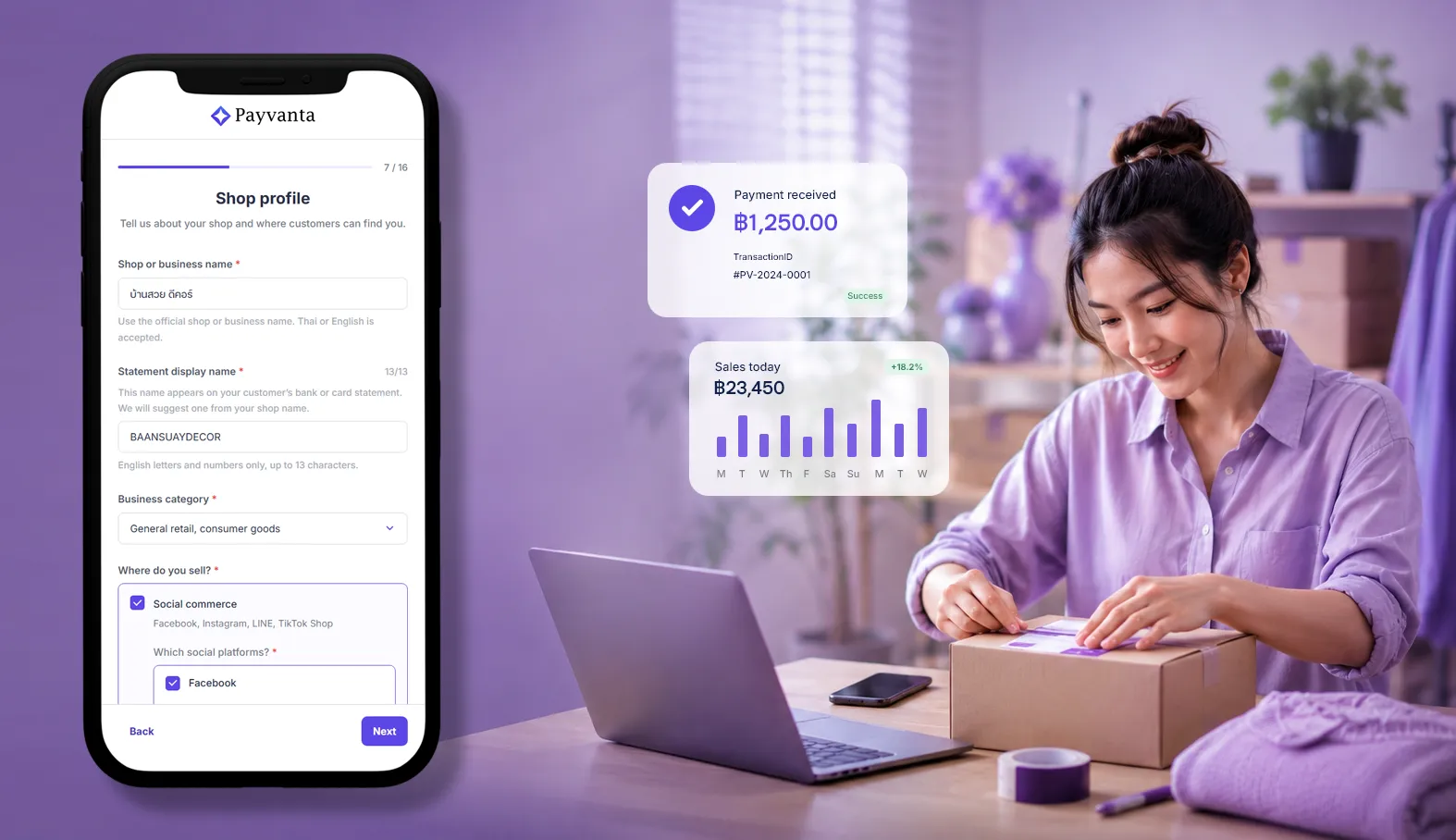
- Shop name + name on slipชื่อร้านค้า + ชื่อที่แสดงบนสลิป
- Business categoryหมวดธุรกิจ
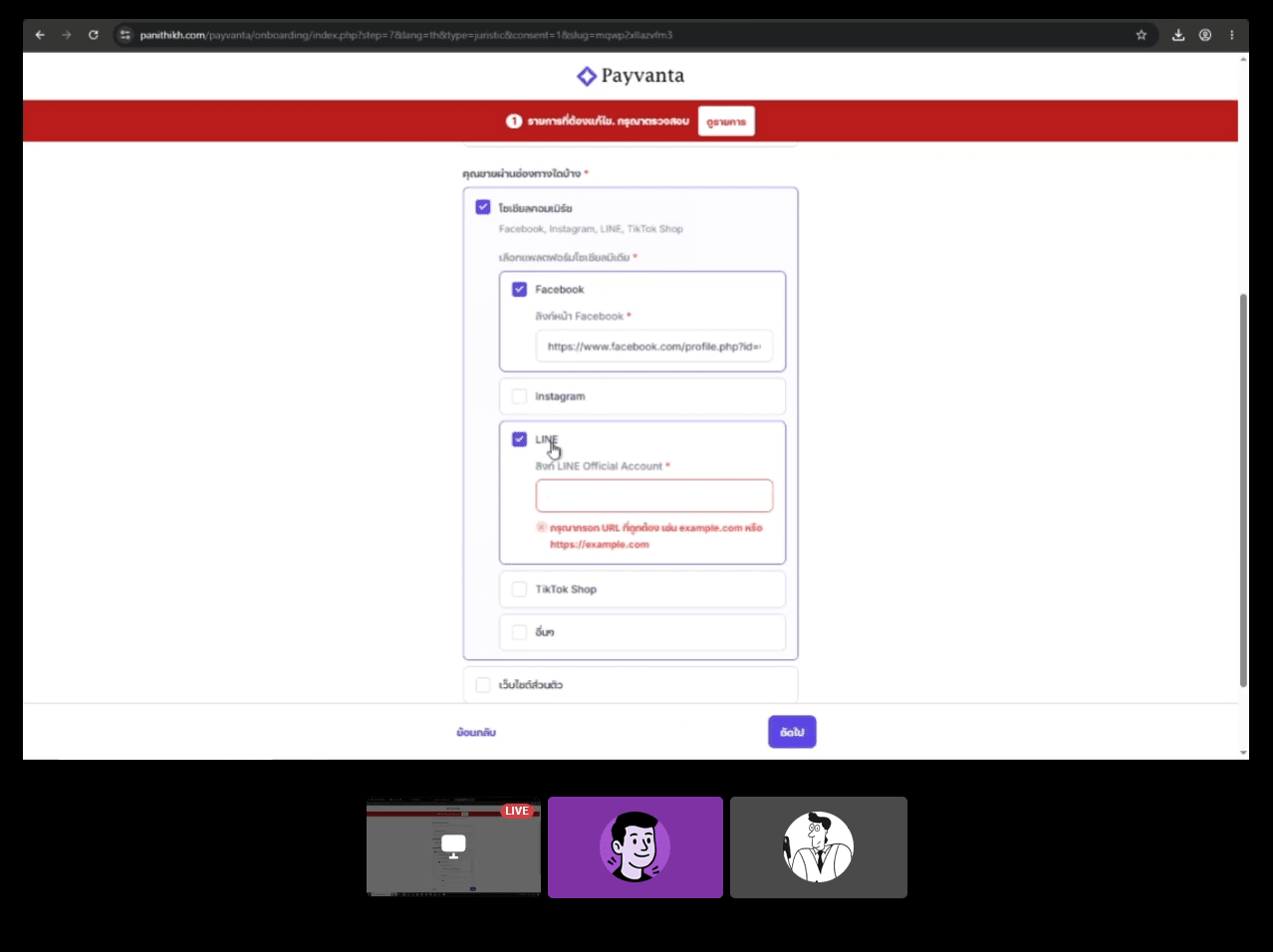
- Sales channelsช่องทางการขาย
- Storefront + product photosภาพหน้าร้าน + สินค้า
- Sales statisticsข้อมูลสถิติการขาย
- Company name + reg. numberชื่อบริษัท + เลขทะเบียนนิติบุคคล
- Authorized directors (up to 5)กรรมการผู้มีอำนาจ (สูงสุด 5 คน)
Financialข้อมูลการเงิน
- Source of incomeแหล่งที่มาของรายได้
- Estimated monthly incomeรายได้โดยประมาณต่อเดือน
- Average order valueมูลค่าเฉลี่ยต่อออเดอร์
- Payment setup typeรูปแบบการตั้งค่าการชำระเงิน
- Refund policyนโยบายการคืนเงิน
- Settlement bank accountบัญชีธนาคารสำหรับรับเงิน
Documentsเอกสาร
- National ID card (front + back)บัตรประชาชน (หน้า + หลัง)
- Bank book or bank statementสมุดบัญชีหรือรายการเดินบัญชี
- Company registration certificate*หนังสือรับรองบริษัท*
- Shareholder list (Bor Jor 5)*บัญชีรายชื่อผู้ถือหุ้น (บอจ.5)*
- VAT registration (Por Por 20)*ใบทะเบียนภาษีมูลค่าเพิ่ม (ภพ.20)*
- Power of attorney*หนังสือมอบอำนาจ*
Why is each field and document collected?ทำไมต้องเก็บข้อมูลและเอกสารแต่ละรายการ?
| Itemรายการ |
Applies toใช้กับ |
Why it is collectedเหตุผลที่เก็บ |
| Identityข้อมูลระบุตัวตน |
| Face photo taken during applicationภาพถ่ายใบหน้าขณะกำลังสมัคร |
Allทุกคน |
Confirms the applicant is really in front of the camera and is the same person as on the ID card. Prevents someone applying with stolen documents.ยืนยันว่าผู้สมัครอยู่หน้ากล้องจริงและเป็นคนเดียวกับในบัตร ป้องกันการแอบอ้างด้วยเอกสารที่ถูกขโมย |
| Businessข้อมูลธุรกิจ |
| Name on slipชื่อที่แสดงบนสลิป |
Allทุกคน |
Shown on the customer's payment slip. Limited to 13 English characters because of payment system limits.แสดงบนสลิปการชำระเงินของลูกค้า จำกัดไม่เกิน 13 ตัวอักษรภาษาอังกฤษ ตามข้อจำกัดของระบบชำระเงิน |
| Business categoryหมวดธุรกิจ |
Allทุกคน |
Sets the fee rate and picks out restricted business types that need extra checks before approval.ใช้กำหนดอัตราค่าธรรมเนียม และคัดแยกธุรกิจประเภทที่มีข้อจำกัด ซึ่งต้องตรวจสอบเพิ่มเติมก่อนอนุมัติ |
| Sales channelsช่องทางการขาย |
Allทุกคน |
Separates online shops from physical stores. Each has a different fraud risk and may need different documents.แยกร้านออนไลน์กับร้านที่มีหน้าร้านจริง แต่ละแบบมีความเสี่ยงด้านการทุจริตต่างกัน และอาจต้องใช้เอกสารต่างกัน |
| Storefront + product photosภาพหน้าร้าน + สินค้า |
Allทุกคน |
Proves the business really exists. Physical stores show the shopfront with its sign; online shops show their website or social page.หลักฐานว่าธุรกิจมีอยู่จริง ร้านที่มีหน้าร้านต้องเห็นหน้าร้านพร้อมป้ายชื่อ ร้านออนไลน์ใช้ภาพหน้าเว็บหรือโซเชียลมีเดีย |
| Sales statisticsข้อมูลสถิติการขาย |
Allทุกคน |
Used to set the starting transaction limit for the merchant account when it is approved.ใช้กำหนดวงเงินธุรกรรมเริ่มต้นของบัญชีร้านค้าตอนพิจารณาอนุมัติ |
| Financialข้อมูลการเงิน |
| Source of incomeแหล่งที่มาของรายได้ |
Allทุกคน |
Required by anti-money laundering law. Used to check that the declared income fits the expected sales.เป็นข้อกำหนดตามกฎหมายป้องกันการฟอกเงิน ใช้ตรวจว่ารายได้ที่แจ้งสอดคล้องกับยอดขายที่คาดว่าจะเกิดขึ้น |
| Average order valueมูลค่าเฉลี่ยต่อออเดอร์ |
Allทุกคน |
Used to estimate the risk of refund requests and payment disputes. Shops with high-value orders get a closer check before approval.ใช้ประเมินความเสี่ยงที่ลูกค้าจะขอเงินคืนหรือโต้แย้งรายการ ร้านที่มีออเดอร์มูลค่าสูงจะถูกตรวจสอบละเอียดขึ้นก่อนอนุมัติ |
| Refund policyนโยบายการคืนเงิน |
All, if refunds offeredทุกคน กรณีมีการคืนเงิน |
Kept as evidence if a customer asks for a refund or disputes a payment. Accepted as a PDF or image.ใช้เป็นหลักฐานกรณีลูกค้าขอเงินคืนหรือโต้แย้งรายการ รับเป็นไฟล์ PDF หรือรูปภาพ |
| Documentsเอกสาร |
| National ID cardบัตรประชาชนFront + backหน้า + หลัง |
Allทุกคน |
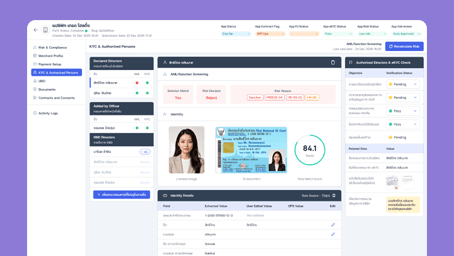
Verifies identity. The system reads the name, ID number, date of birth, and address from the card, and compares the card photo with the face photo.ใช้ยืนยันตัวตน ระบบอ่านชื่อ เลขบัตร วันเกิด และที่อยู่จากบัตรให้อัตโนมัติ และเทียบภาพบนบัตรกับภาพถ่ายใบหน้า |
| Bank book or bank statementสมุดบัญชีหรือรายการเดินบัญชี |
Allทุกคน |
Proves the applicant owns the payout account. Account name, number, and bank must be visible and match what was entered.ยืนยันว่าเป็นเจ้าของบัญชีรับเงิน ชื่อบัญชี เลขบัญชี และชื่อธนาคารต้องเห็นชัดและตรงกับข้อมูลที่กรอกไว้ |
| Company registration certificateหนังสือรับรองบริษัทIssued within 3 monthsอายุไม่เกิน 3 เดือน |
Juristicนิติบุคคล |
Confirms the company is legally registered. The system fills in the company name, registration number, and address from it.ยืนยันว่าเป็นบริษัทที่จดทะเบียนจริง ระบบนำชื่อบริษัท เลขทะเบียน และที่อยู่ไปกรอกให้อัตโนมัติ |
| Shareholder list (Bor Jor 5)บัญชีรายชื่อผู้ถือหุ้น (บอจ.5)Issued within 3 monthsอายุไม่เกิน 3 เดือน |
Juristicนิติบุคคล |
Shows who the authorized directors and shareholders are. The system fills in the director list, so each director can be sent a link to verify their identity.ระบุกรรมการผู้มีอำนาจและผู้ถือหุ้น ระบบนำรายชื่อกรรมการไปกรอกให้อัตโนมัติ เพื่อส่งลิงก์ยืนยันตัวตนให้กรรมการแต่ละคน |
| VAT registration (Por Por 20)ใบทะเบียนภาษีมูลค่าเพิ่ม (ภพ.20) |
Juristic, if VAT-registeredนิติบุคคลที่จด VAT |
Confirms the business is VAT-registered. Only asked for if the applicant says the business is registered.ยืนยันว่าธุรกิจจด VAT แล้ว เก็บเฉพาะกรณีที่ผู้สมัครตอบว่าจด VAT |
| Power of attorneyหนังสือมอบอำนาจ |
Juristic, if not a directorนิติบุคคล กรณีไม่ใช่กรรมการ |
Lets someone who is not a director apply on behalf of the company. Must be signed by an authorized director.มอบอำนาจให้ผู้ที่ไม่ใช่กรรมการยื่นใบสมัครแทนบริษัท ต้องมีลายเซ็นกรรมการผู้มีอำนาจ |
Information Architecture
How the steps are groupedการจัดกลุ่มขั้นตอน
Steps are grouped into seven zones based on the type of data being collected. The table below shows the juristic applicant path (18 screens).แบ่งขั้นตอนเป็น 7 โซนตามประเภทข้อมูลที่เก็บ ตารางด้านล่างแสดงเส้นทางของผู้สมัครนิติบุคคล (18 หน้าจอ)
Zoneโซน 1
Lead Captureเก็บข้อมูลติดต่อ | Zoneโซน 2
Commitmentการยอมรับเงื่อนไข | Zoneโซน 3
Businessข้อมูลธุรกิจ | Zoneโซน 4
Applicantผู้สมัคร | Zoneโซน 5
Settlementการรับเงิน | Zoneโซน 6
Identityการยืนยันตัวตน | Zoneโซน 7
Completionเสร็จสิ้น |
1.1 Contact Detailsข้อมูลติดต่อ Name TH + EN, mobile, emailชื่อไทย + อังกฤษ เบอร์มือถือ อีเมล |
2.1 Terms and Conditionsข้อกำหนดและเงื่อนไข |
3.1 Shop Profileโปรไฟล์ร้านค้า |
4.1 Company Documentsเอกสารบริษัท Cert, Bor Jor 5, VAT, POAหนังสือรับรอง บอจ.5 ภ.พ.20 หนังสือมอบอำนาจ |
5.1 Bank Accountบัญชีธนาคาร |
6.1 Biometric Consentการยินยอมด้านชีวมิติ |
7.1 Confirmationยืนยันการส่งใบสมัคร Director eKYC links sentส่งลิงก์ eKYC ให้กรรมการ |
1.2 Phone Verificationยืนยันเบอร์โทรศัพท์ SMS OTPOTP ทาง SMS |
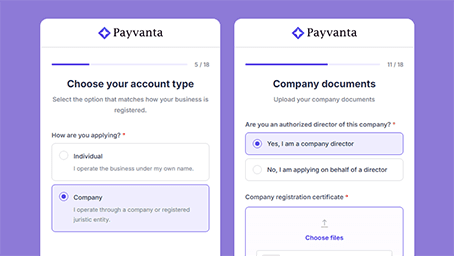
2.2 Account Typeเลือกประเภทบัญชี Fork: Juristicจุดแยก: นิติบุคคล |
3.2 Sales Volumeยอดขาย |
4.2 Company Profileโปรไฟล์บริษัท Pre-filled from 4.1 OCRกรอกล่วงหน้าจาก OCR ของ 4.1 |
| 6.2 ID Card Scanสแกนบัตรประชาชน |
|
1.3 Email Verificationยืนยันอีเมล Email OTPOTP ทางอีเมล |
2.3 Privacy Preferencesการตั้งค่าความเป็นส่วนตัว 3 PDPA consentsความยินยอม PDPA 3 รายการ |
3.3 Payment Setupการตั้งค่าการชำระเงิน |
4.3 Company Directorsกรรมการบริษัท Up to 5 directorsสูงสุด 5 คน |
| 6.3 ID Reviewตรวจสอบข้อมูลบัตร |
|
| | 3.4 Refund Policyนโยบายการคืนเงิน |
| | 6.4 Selfie / Livenessเซลฟี่ / Liveness |
|
Fork point (2.2)จุดแยกเส้นทาง (2.2)
Juristic only (Zone 4)เฉพาะนิติบุคคล (โซน 4)
Terminal screenหน้าจอสุดท้าย
Individual applicants skip 4.1 to 4.3 (company documents, company profile, directors) and fill in an Individual Profile (occupation, industry, income) instead, for 16 screens in total.กรณีสมัครแบบบุคคลธรรมดา ไม่ต้องทำขั้นตอน 4.1 ถึง 4.3 (เอกสารบริษัท โปรไฟล์บริษัท กรรมการบริษัท) แต่กรอกโปรไฟล์ผู้สมัคร (อาชีพ อุตสาหกรรม รายได้) แทน รวมทั้งหมด 16 หน้าจอ
Swimlane: who does whatSwimlane: ใครทำอะไร
Maps the onboarding process across five phases and the actors involved: individual and juristic applicants, directors (juristic entities only), and the system. Shows what each actor does, where work happens in parallel, and how the process hands off to the reviewer.แสดงกระบวนการสมัครใน 5 ช่วง แยกตามผู้เกี่ยวข้อง ได้แก่ ผู้สมัครบุคคลธรรมดา ผู้สมัครนิติบุคคล กรรมการ (เฉพาะนิติบุคคล) และระบบ ให้เห็นว่าแต่ละฝ่ายทำอะไร งานไหนเกิดขึ้นพร้อมกัน และกระบวนการส่งต่อให้เจ้าหน้าที่ตรวจสอบอย่างไร
Phaseช่วง
Individual Applicantผู้สมัครบุคคลธรรมดา
Juristic Applicant (POA)ผู้สมัครนิติบุคคล (ผู้รับมอบอำนาจ)
Directorกรรมการ
System & Reviewระบบและการตรวจสอบ
Registrationลงทะเบียน
Contact detailsข้อมูลติดต่อ
Phone + email OTPOTP เบอร์โทร + อีเมล
Terms + privacy consentsยอมรับเงื่อนไข + ความเป็นส่วนตัว
Account type (Individual)ประเภทบัญชี (บุคคลธรรมดา)
Contact detailsข้อมูลติดต่อ
Phone + email OTPOTP เบอร์โทร + อีเมล
Terms + privacy consentsยอมรับเงื่อนไข + ความเป็นส่วนตัว
Account type (Juristic)ประเภทบัญชี (นิติบุคคล)
Send OTP codesส่งรหัส OTP
Record consentsบันทึกการยินยอม
Shop & Businessร้านค้าและธุรกิจ
Shop profile + sales channelsโปรไฟล์ร้านค้า + ช่องทางการขาย
Sales volume + photosยอดขาย + ภาพถ่าย
Payment setupการตั้งค่าการชำระเงิน
Refund policyนโยบายการคืนเงิน
Shop profile + sales channelsโปรไฟล์ร้านค้า + ช่องทางการขาย
Sales volume + photosยอดขาย + ภาพถ่าย
Payment setupการตั้งค่าการชำระเงิน
Refund policyนโยบายการคืนเงิน
Company DocsเอกสารบริษัทJuristic onlyเฉพาะนิติบุคคล
Company registration certหนังสือรับรองบริษัท
Shareholder list (Bor Jor 5)บอจ.5
VAT certificateภพ.20
Extract fields from documentsดึงข้อมูลจากเอกสาร
Auto-prefill company profileกรอกโปรไฟล์บริษัทล่วงหน้าอัตโนมัติ
Generate director listสร้างรายชื่อกรรมการ
Identity & Settlementตัวตนและบัญชีรับเงิน
Individual profileโปรไฟล์ผู้สมัคร
Settlement bank accountบัญชีธนาคารสำหรับรับเงิน
Bank book uploadอัปโหลดสมุดบัญชี
eKYC consentการยินยอม eKYC
ID card scanสแกนบัตรประชาชน
Selfieเซลฟี่
Company profile reviewตรวจสอบโปรไฟล์บริษัท
Director list entryกรอกรายชื่อกรรมการ
Settlement bank accountบัญชีธนาคารสำหรับรับเงิน
Bank book uploadอัปโหลดสมุดบัญชี
eKYC consentการยินยอม eKYC
ID card scanสแกนบัตรประชาชน
Selfieเซลฟี่
Confirm detailsยืนยันข้อมูล
Financial profileข้อมูลการเงิน
ID card scanสแกนบัตรประชาชน
Selfieเซลฟี่
Triggered by link after applicant submitsเริ่มผ่านลิงก์หลังผู้สมัครส่งใบสมัคร
OCR from ID cardOCR จากบัตรประชาชน
Validate bank book vs form dataตรวจสมุดบัญชีเทียบกับข้อมูลในฟอร์ม
Screening & Reviewคัดกรองและตรวจสอบ
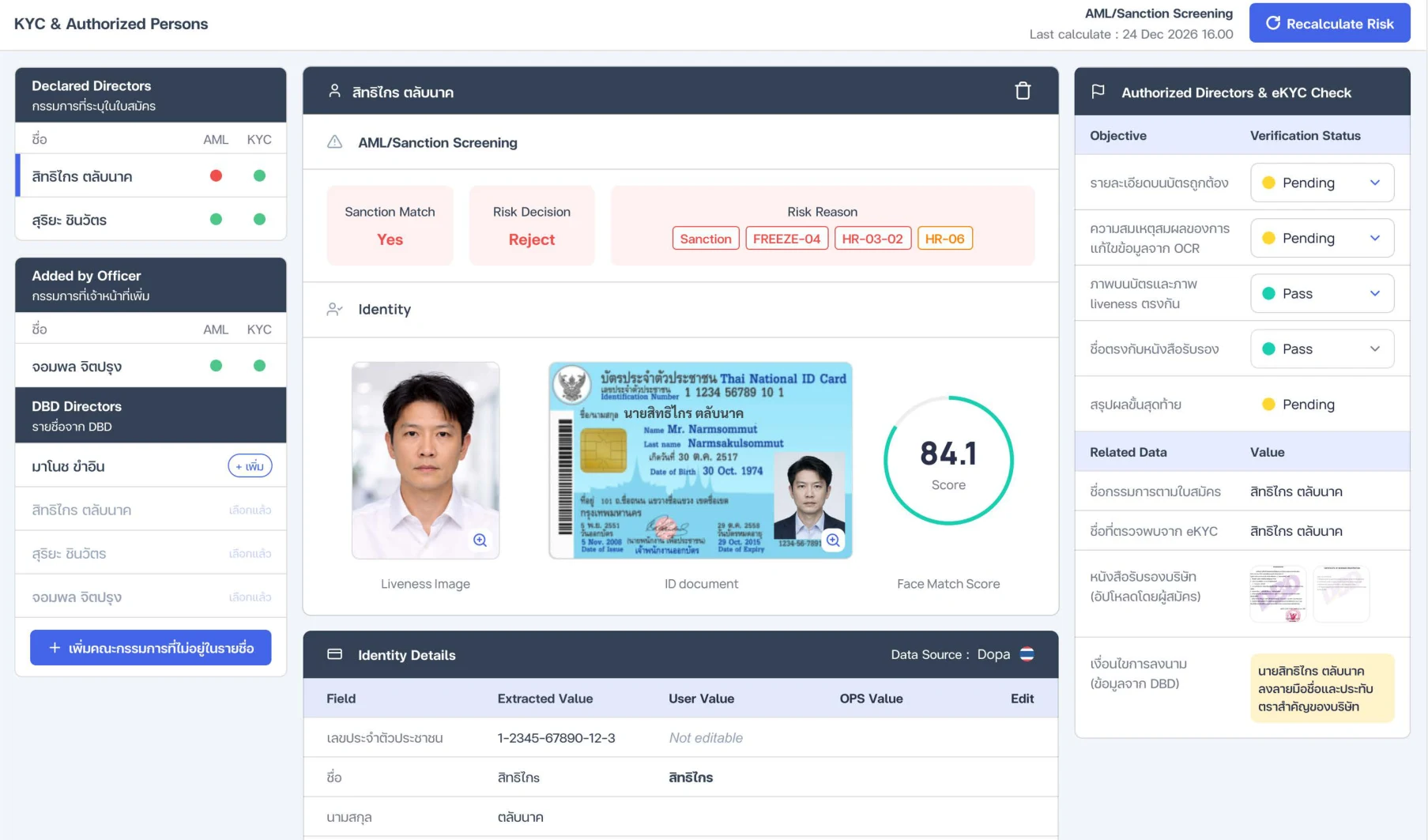
Risk screeningคัดกรองความเสี่ยง
Flag document mismatchesแจ้งเตือนเอกสารที่ไม่ตรงกัน
Reviewer workspace decisionเจ้าหน้าที่ตัดสินใจใน workspace
eKYC
ID card capture and liveness selfieการถ่ายภาพบัตรประชาชน และเซลฟี่ Liveness
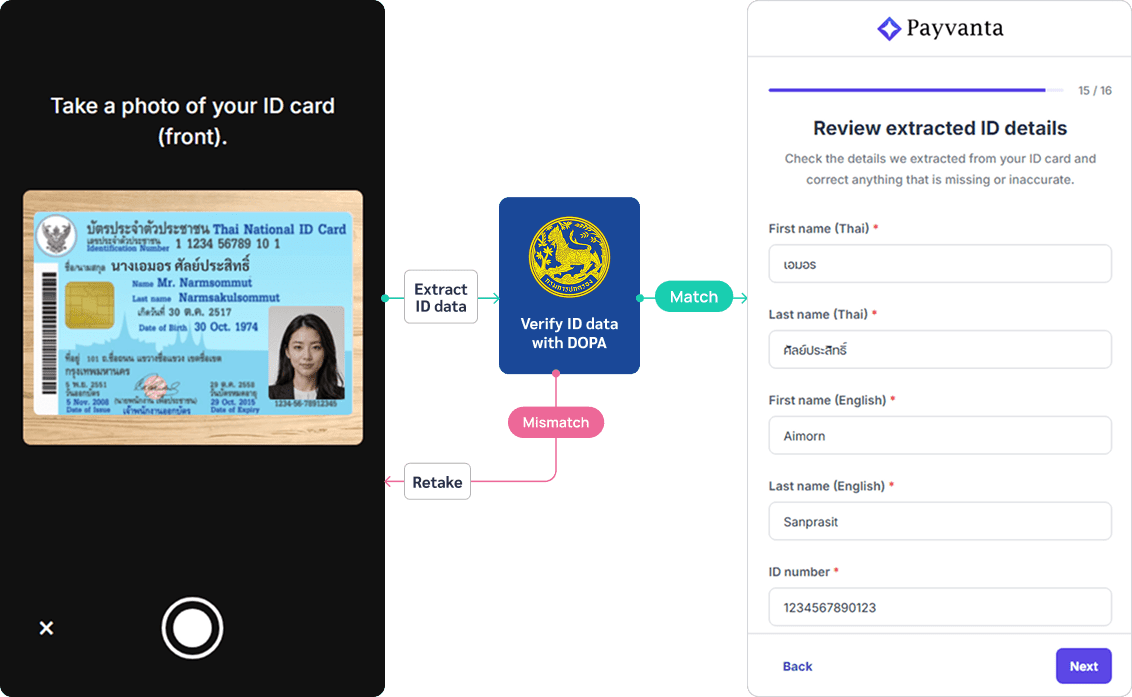
How does the ID card capture work?การถ่ายภาพบัตรประชาชนทำงานอย่างไร?
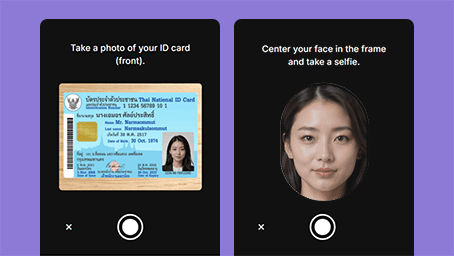
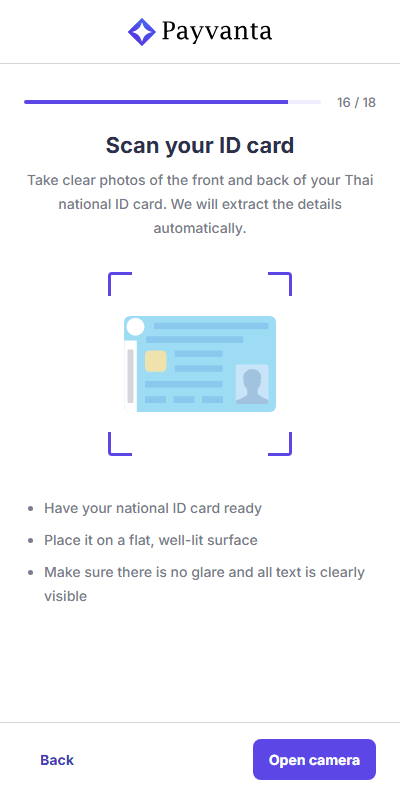
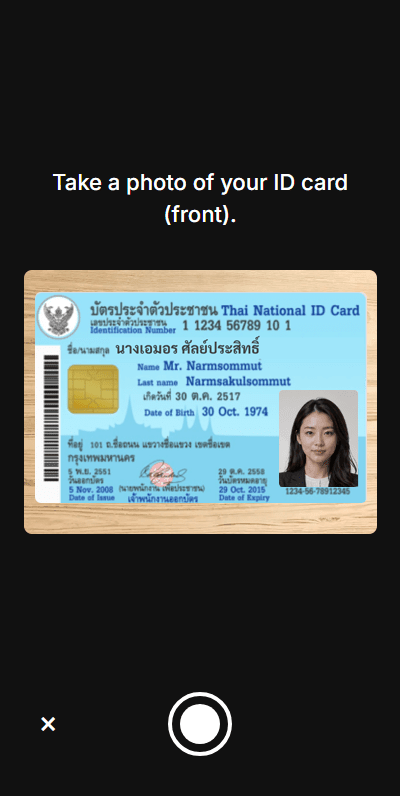
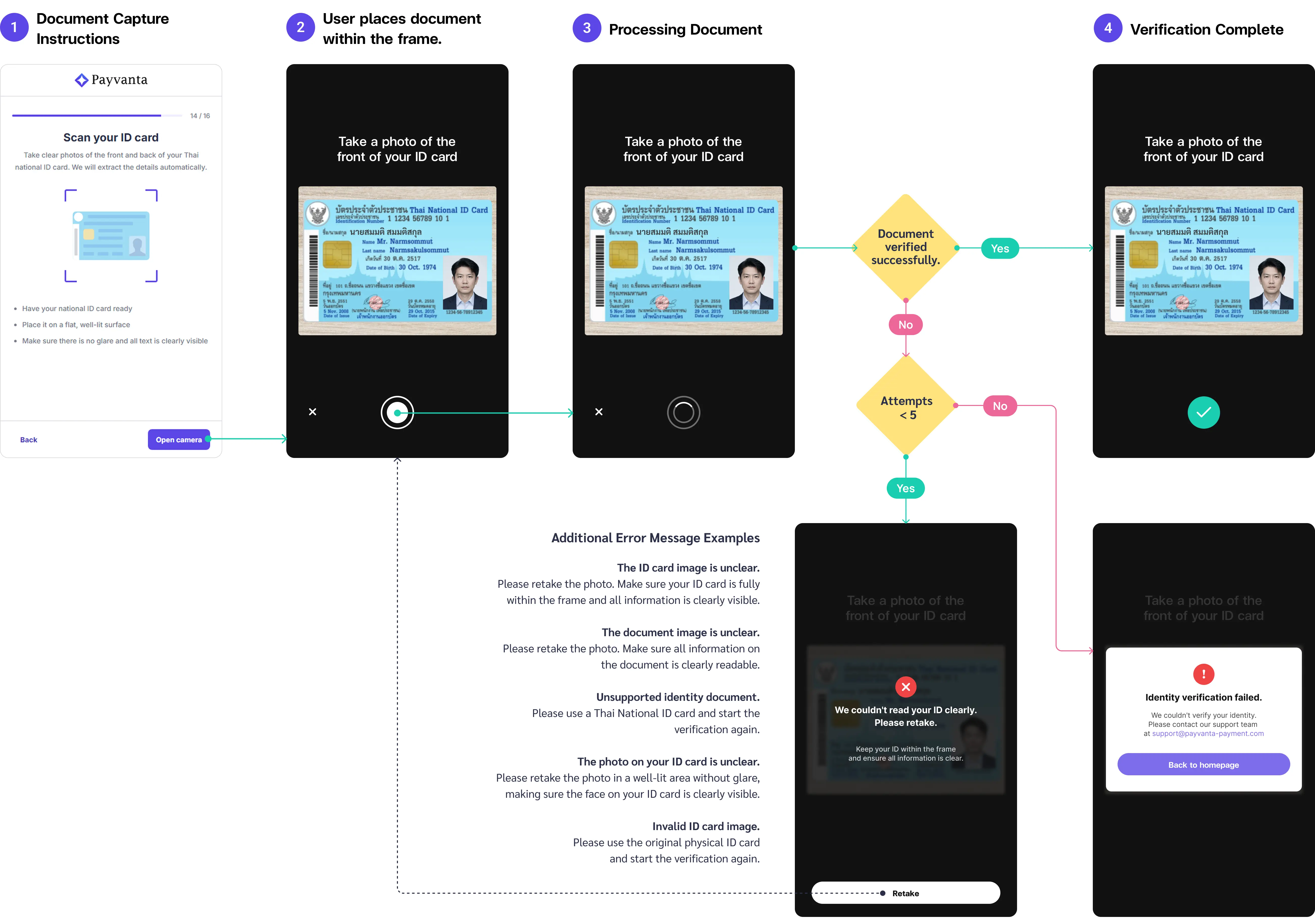
The applicant positions the card within the on-screen frame and captures it. The system then runs OCR to extract the card's fields and verifies the document itself. Each failed capture returns a specific error, mapped to a targeted retake prompt (for example, glare, blur, or a cropped edge), so the applicant knows exactly what to fix before trying again. After 5 failed attempts, the applicant has to start a new application.
ผู้สมัครวางบัตรให้อยู่ในกรอบบนหน้าจอแล้วถ่ายภาพ ระบบจะอ่านข้อมูลด้วย OCR และตรวจสอบความถูกต้องของเอกสาร หากภาพไม่ผ่าน ระบบจะแจ้งสาเหตุพร้อมคำแนะนำให้ถ่ายใหม่ เช่น แสงสะท้อน ภาพเบลอ หรือขอบบัตรถูกตัด ถ่ายใหม่ได้สูงสุด 5 ครั้ง หากไม่ผ่านครบ 5 ครั้ง ผู้สมัครต้องเริ่มสมัครใหม่
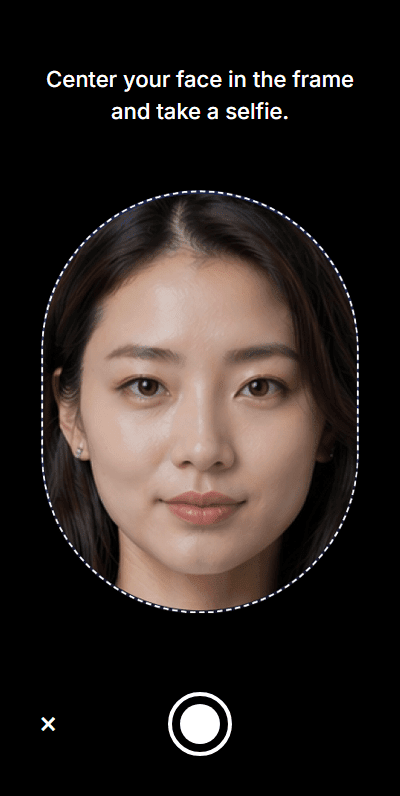
How does the liveness selfie prove the applicant is really there?เซลฟี่สำหรับตรวจสอบ Liveness ยืนยันได้อย่างไรว่าเป็นผู้สมัครตัวจริง?
The applicant centers their face within an oval guide and taps to shoot when ready, with real-time framing guidance so the shot is usable on the first try. The applicant can retry up to 5 times, and after 5 failed attempts has to start a new application. The captured selfie is stored and compared against the ID card photo, and that comparison runs asynchronously after submission rather than blocking the applicant in the moment.
ผู้สมัครจัดใบหน้าให้อยู่ในกรอบวงรีแล้วกดถ่ายภาพเมื่อพร้อม ระบบจะแนะนำการจัดใบหน้าแบบเรียลไทม์เพื่อช่วยให้ถ่ายผ่านตั้งแต่ครั้งแรก หากภาพไม่ผ่าน ผู้สมัครถ่ายใหม่ได้สูงสุด 5 ครั้ง หากไม่ผ่านครบ 5 ครั้ง ต้องเริ่มสมัครใหม่ ภาพที่ผ่านการตรวจสอบจะถูกนำไปเปรียบเทียบกับภาพบนบัตรประชาชน โดยระบบจะประมวลผลการเปรียบเทียบเบื้องหลังหลังส่งใบสมัคร
Form Builder
How does the form keep up when requirements change?ฟอร์มรองรับการเปลี่ยนแปลงของ requirement ได้อย่างไร?
Compliance requirements and business rules change over time, for example a new document to collect or a field that becomes optional. The form is built with a Form Builder, so steps and fields can be added, removed, reordered, or relabeled in both languages, and the change shows up in the form right away without rebuilding the system.ข้อกำหนด (compliance) และเงื่อนไขทางธุรกิจเปลี่ยนได้ตลอด เช่น ต้องเก็บเอกสารเพิ่ม หรือฟิลด์ที่เคยบังคับกลายเป็นไม่บังคับ ฟอร์มจึงสร้างด้วย Form Builder ที่เพิ่ม ลบ สลับลำดับ หรือแก้ข้อความของขั้นตอนและฟิลด์ได้ทั้ง 2 ภาษา และเห็นผลในฟอร์มทันทีโดยไม่ต้องพัฒนาระบบใหม่
The demo below is a sandbox with 4 steps from the real form. Try selecting a field, editing its label, toggling Required, or dragging steps and fields to reorder them. Changes are not saved.ด้านล่างเป็น demo แบบ sandbox ที่ใช้ 4 ขั้นตอนจากฟอร์มจริง ลองเลือกฟิลด์ แก้ข้อความ เปิดปิด Required หรือลากสลับลำดับขั้นตอนและฟิลด์ได้ การแก้ไขจะไม่ถูกบันทึก
Open the Form Builder full screen →เปิด Form Builder แบบเต็มจอ →